Overview
Three years. Three products. One through-line.
This case study covers three phases of the same product evolution. Each one solved a different layer of the same core problem: enterprise AI is only valuable if non-technical users can actually use it.
Agent Assist Redesign
2022
Setup took 20+ hours and required professional services
GenAI Studio — Interaction Summaries
2023
Default AI summaries didn't capture what customers actually cared about
GenAI Studio — Custom Charting
2024
AI-generated insights had no way to become actionable dashboards
Phase 1 · 2022
Agent Assist Redesign
The problem
When I joined Five9, configuring the contact center AI assistant required weeks of expensive professional services engagement. Contact center managers — the people who actually knew their business — had no path to self-serve. The product was powerful but locked behind complexity.
- Navigation across multiple disconnected screens with no clear sense of which assistant was being edited
- Configuration elements couldn't be reused across assistants — copy, paste, repeat, forever
- Creating AI triggers required weeks of model training
- Guidance cards required HTML knowledge to write
What I did
Unified the configuration view. I consolidated all assistant configuration into a single "if this, then that" rule view. Managers could see their entire assistant at a glance instead of navigating fragmented screens.
Made elements reusable. The guidance card system was redesigned for cross-assistant sharing. Common configurations could be built once and applied anywhere — cutting configuration time in half and standardizing consistency across the platform.
Replaced HTML with WYSIWYG. The legacy guidance card editor required HTML knowledge. A visual editor opened configuration to non-technical admins entirely.
Introduced keyword spotting. Instead of weeks of model training, keyword spotting let managers create triggers from a few typed words — instantly. This doubled the potential customer pool by removing the technical barrier to entry.
Results
"Five9 used to feel like three raccoons in a trench coat, but now I'm beginning to believe they're one person."
Professional Services Provider — Five9
Phase 2 · 2023
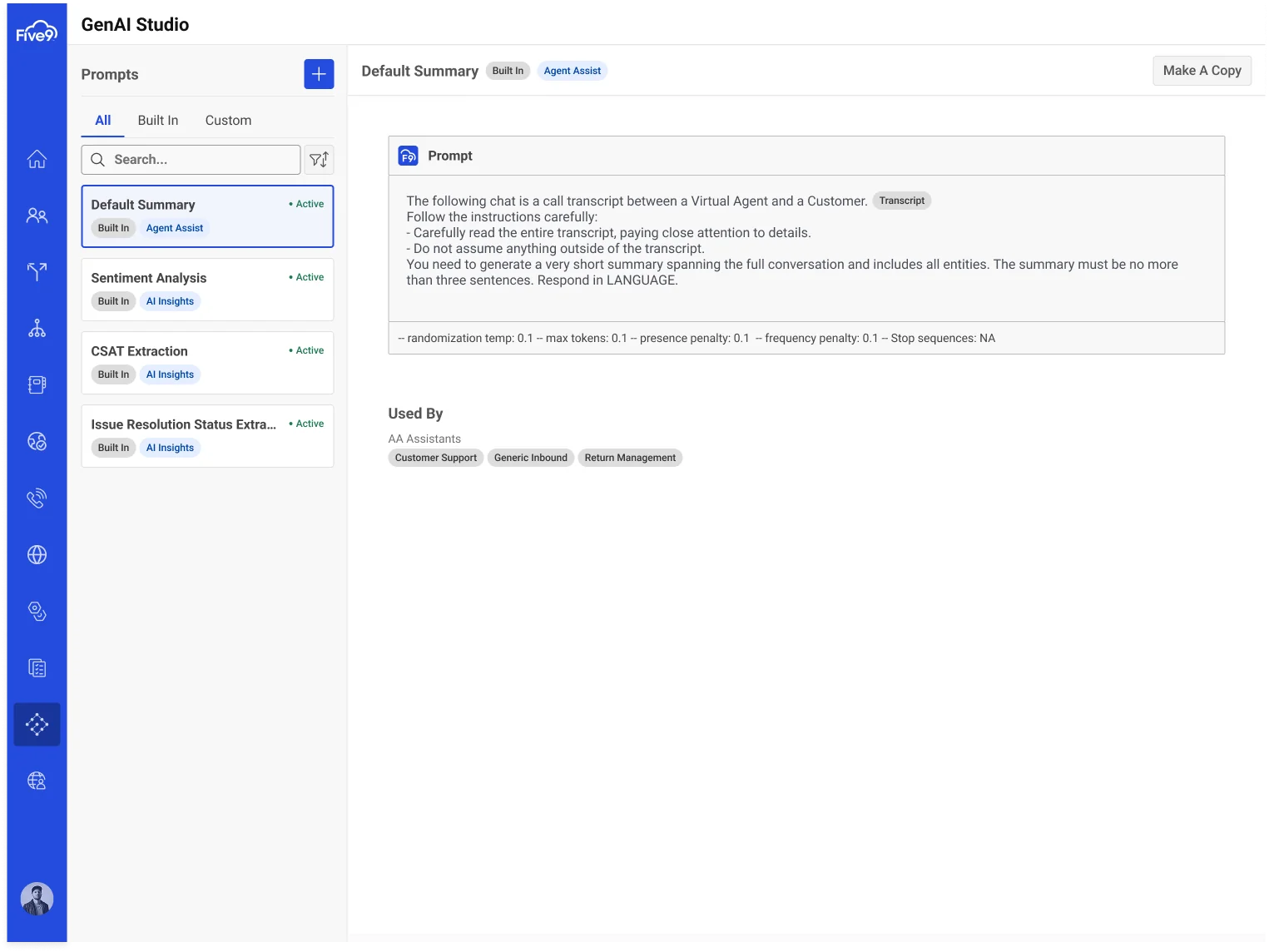
GenAI Studio — Interaction Summaries
The problem
Five9 was ready to pivot from legacy AI to generative AI. The opportunity was massive — and so was the scope. I partnered with my PM to define the first use case that would make a genuine first impression: custom interaction summaries.
Contact centers spend significant time on after-call work — summarizing what happened, tagging outcomes, logging notes. Default AI summaries weren't capturing the specific details each business actually cared about.
Research
I interviewed 6 non-technical contact center managers. Two concerns came up in every session:
"I'm not sure I'd know how to get started on my own."
"I want to be able to test a bunch of calls at once — my management wants to make sure the prompt is performing before we launch."
Key insight: Most users had some familiarity with ChatGPT. Rather than design from scratch, I leveraged that existing mental model — reducing anxiety by making the new interface feel like something they'd already used.
Key design decisions
Built-in prompts as scaffolding. Instead of a blank canvas, users started with pre-built prompts they could run immediately and modify. Seeing real output before changing anything built confidence and gave them a concrete target to improve.
Batch evaluation by default. Managers needed to prove prompt performance to their leadership before launch. Evaluation ran against 5 interactions by default — adjustable, but good enough out of the box. This directly addressed the "my management needs proof" concern without making users configure it.
Prompt grading (roadmap). After testing, users said they couldn't remember which prompts had performed best by their next session. I mocked up a prompt grading feature. It didn't make the first release, but it went directly onto the roadmap — a design decision made from evidence, not intuition.
Results

UCToday Most Innovative Product Award
2023 — for GenAI Studio at Five9
"It was so easy to get a custom fit, it felt like cheating."
Beta Tester — GenAI Studio
Phase 3 · 2024
GenAI Studio — Custom Charting
The problem
After summaries shipped, users started asking the next logical question: "Can I get these results on a chart?"
Contact center managers had AI-generated insights — sentiment analysis, competitor mentions, issue type — but no way to visualize them alongside the metrics they already tracked (CSAT, agent performance, interaction length). The data existed. Seeing it was the problem.
What I did
Template-constrained, power-user-friendly. A prompt creation flow for charting metrics that balanced structure (templates that constrain output to chartable formats) with flexibility (freedom to define any custom metric). The same mental model from summaries carried over — built-in templates first, then customization.
Cross-filtering against existing data. Custom prompt metrics could be filtered against CSAT, agent performance, campaigns, and interaction length — connecting AI-generated insights to the data managers already used to make decisions.
Surfacing prompts in settings. Consistent feedback: users couldn't find where to create prompts for charting. I moved the prompt creation entry point from a buried location into the AI insights settings page — a small navigation decision with an outsized impact on discoverability.
Results
"This is the first time our data has felt truly usable."
Customer — after feature launch
The Through-Line
Three years. Three products. One consistent approach.
Find the real user
Not the power user, not the technical user — the person who actually needs to make this work in their job. In every phase, that was the contact center manager, not the IT team.
Use what they already know
Reduce the learning curve by mapping to familiar patterns. ChatGPT for prompt behavior. WYSIWYG for card editing. Standard filters for cross-referencing data. The smaller the cognitive jump, the faster the trust.
Build for confidence, not just capability
Enterprise users need to trust a tool before they'll rely on it. Batch testing, built-in templates, and smart defaults are design decisions that build trust — not just utility.
Ship, listen, iterate
Keyword sets moved from hidden menus to plain view. Prompt grading went from user feedback to the roadmap. The product kept getting better because the feedback loop was built into the process.